A dark-mode map
NightMap.RmdIntroduction
The ExploreDataSets vignette builds a static map with a
light “nautical” theme. Here we redo that map in a dark mode, borrowing
the palette from the package’s hex sticker: a navy night sky, warm
orange land, a purple route, and star markers for the collection
stops.
The palette
The colors are picked to match the sticker. Anything you want to swap — say, the accent color for the route — just override the corresponding entry.
sticker_pal <- list(
night = '#00202e', # deep navy background
ocean = '#152A5A', # slightly lighter than night, for the plot panel
ocean_hi = '#37718E', # bathymetry hi end
gold = '#E8A040', # hex border / land primary
land_light = '#ffd380', # land fill (lighter orange)
coral = '#E86A55', # land border / warm accent
cream = '#F0E5B0', # ship body / label text
mint = '#74A57F', # mast / topography
purple = '#531CB3', # route (dark end)
lavender = '#C9A5F5', # route (light end) / late-in-trip
star_gold = '#F5D060', # city stars
star_pink = '#bc5090' # tertiary highlight
)The dark theme
A near-drop-in replacement for the light theme_nautical
from the other vignette: same structure, but every element is repainted
from the sticker palette.
theme_nautical_night <- function() {
theme(
aspect.ratio = 4/3,
text = element_text(family = "Optima", color = sticker_pal$cream),
axis.title = element_text(colour = sticker_pal$cream),
axis.text = element_text(colour = sticker_pal$mint, face = "italic"),
axis.text.x = element_text(hjust = 1, angle = 45),
axis.ticks = element_line(colour = sticker_pal$mint),
plot.title = element_text(hjust = 0.5, color = sticker_pal$pink, face = 'bold'),
plot.subtitle = element_text(hjust = 1, face = 'italic', color = sticker_pal$cream),
plot.caption = element_text(color = sticker_pal$mint, face = 'italic', size = 12),
plot.background = element_rect(fill = sticker_pal$night, color = NA),
panel.background = element_rect(fill = sticker_pal$ocean, color = NA),
panel.border = element_rect(colour = sticker_pal$gold, fill = NA, linewidth = 0.7),
panel.grid.major = element_line(
colour = alpha(sticker_pal$mint, 0.3),
linetype = 'dotted',
linewidth = 0.25
),
panel.grid.minor = element_blank(),
legend.background = element_rect(fill = sticker_pal$night, color = sticker_pal$gold),
legend.key = element_rect(fill = sticker_pal$night, color = NA),
legend.text = element_text(size = 5, color = sticker_pal$cream),
legend.title = element_text(size = 9, hjust = 0.5, color = sticker_pal$cream),
legend.title.position = 'top',
legend.key.size = unit(1, "line"),
legend.position = "bottom",
legend.spacing = unit(0.1, "line")
)
}Preparing the data
Same route/places join used in the light-mode vignette, plus a bounding box focused on the Sea of Cortez.
route <- left_join(
route,
st_drop_geometry(places),
by = c('destination' = 'location_english')
) |>
relocate(geometry, .after = last_col())
bb <- st_bbox(
c(xmin = -114, xmax = -108.75, ymin = 22.5, ymax = 30.25),
crs = st_crs(4326)
)
places <- st_crop(places, bb)
date_scale <- as.Date(
quantile(
as.numeric(route$date_arrive), na.rm = TRUE, probs = c(0.1, 0.5, 0.9)
)
)
date_lbls <- c(
expression(paste("Mar. ", 16^th)),
expression(paste("Mar. ", 28^th)),
expression(paste("Apr. ", 11^th))
)The map
Layered from the bottom up: bathymetry contours in cool blues, land
in warm oranges (gold border on a lighter fill), topography
contours in mint, the route as a purple gradient by arrival date, and
the places as gold star-glyphs with cream labels on a dark backing.
ggplot() +
# bathymetry from deep ocean to shallower shelves
geom_sf(
data = bathymetry,
aes(color = elevation),
lwd = 0.35
) +
scale_color_gradient(
'Depth (m)',
low = sticker_pal$night,
high = sticker_pal$ocean_hi,
guide = 'none'
) +
# land -- warm orange fill with a coral border
geom_sf(
data = land,
fill = sticker_pal$land_light,
color = sticker_pal$coral,
linewidth = 0.25
) +
# topography -- mint to cream gradient by elevation
ggnewscale::new_scale_color() +
geom_sf(
data = topography,
aes(color = elevation),
linewidth = 0.45
) +
scale_color_gradient(
'Elevation (m)',
low = sticker_pal$cream,
high = alpha(sticker_pal$mint, 0.55),
guide = 'none'
) +
# route -- purple gradient along arrival date
ggnewscale::new_scale_color() +
geom_sf(
data = route,
aes(color = date_arrive),
linewidth = 0.8
) +
scale_color_gradient(
'Date',
low = sticker_pal$purple,
high = sticker_pal$lavender,
breaks = date_scale,
labels = date_lbls
) +
# places -- rendered as star glyphs
geom_sf_text(
data = places,
label = '★', # unicode filled star
color = sticker_pal$star_pink,
size = 6
) +
ggrepel::geom_label_repel(
data = places,
aes(label = location_espanol, geometry = geometry),
stat = 'sf_coordinates',
size = 2.4,
color = sticker_pal$cream,
fill = alpha(sticker_pal$night, 0.75),
label.size = NA,
label.padding = 0.15,
segment.color = alpha(sticker_pal$star_gold, 0.6)
) +
# ambiance
coord_sf(xlim = c(bb[1], bb[3]), ylim = c(bb[2], bb[4]), crs = 4326) +
annotation_scale(
bar_cols = c(sticker_pal$gold, sticker_pal$night),
text_col = sticker_pal$cream,
line_col = sticker_pal$gold
) +
annotation_north_arrow(
which_north = 'true',
style = north_arrow_nautical(
fill = c(sticker_pal$cream, sticker_pal$night),
line_col = sticker_pal$gold,
text_col = sticker_pal$cream
)
) +
theme_nautical_night() +
labs(
x = NULL, y = NULL,
title = 'flyer',
subtitle = 'Sea of Cortez, spring 1940',
caption = '"it is advisable to look from the tide pool to the stars\nand back to the tidepool again"'
)
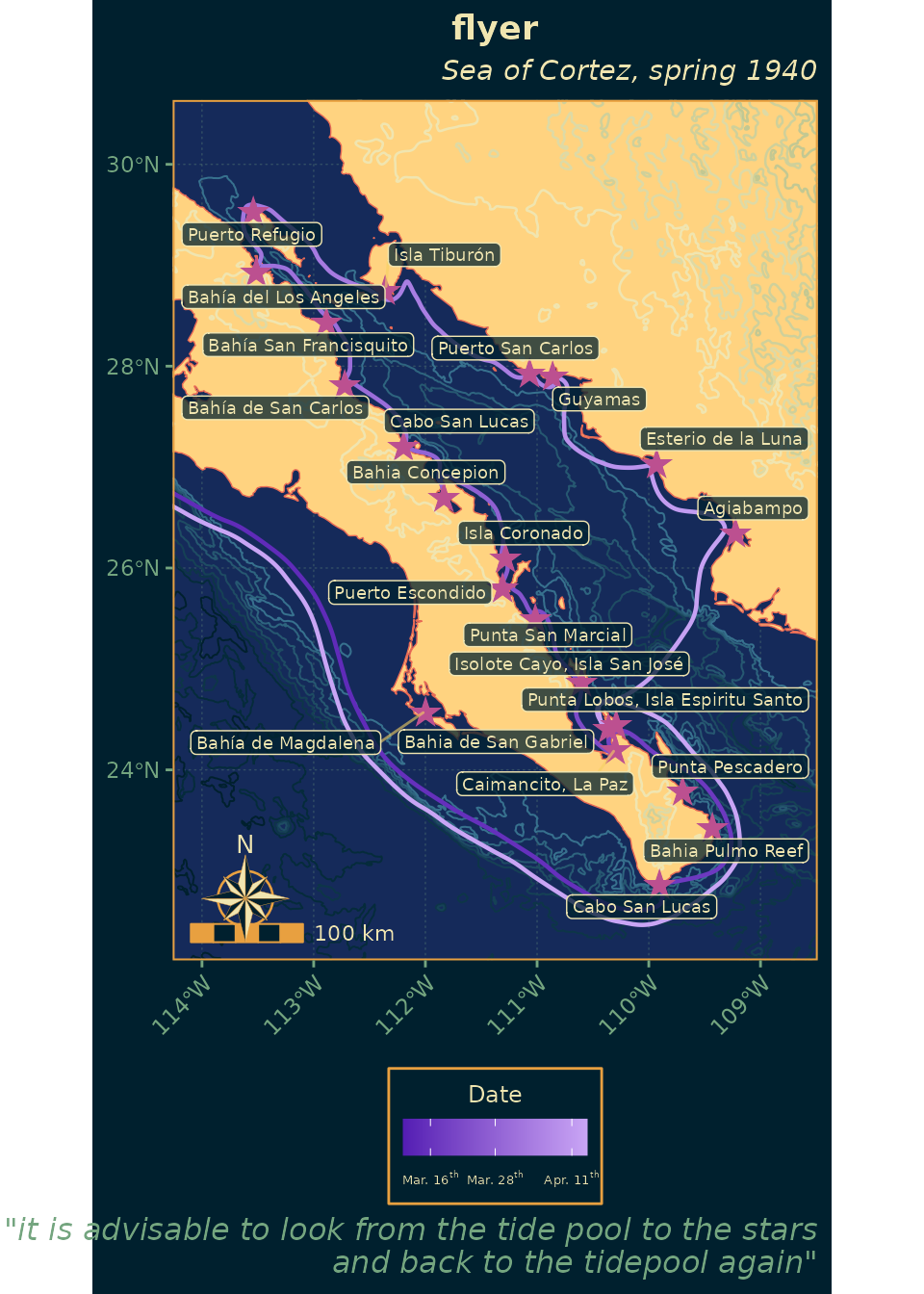
Every color that drives the map lives in the sticker_pal
list at the top of this vignette. Swapping a hex value there (say,
brightening land_light or shifting purple
toward blue) re-tints the entire figure without touching the geom
code.